
Comment Backlinks: 8 Rules and 17 Blog Commenting Sites We Checked
Most comments left for a link get deleted or carry nofollow ugc. Here are 8 rules for comment backlinks that survive moderation, the search operators that find live discussions, and 17 blog commenting sites checked in November 2026.
Hamza Haroon
Updated · 12 min read
Most blog comments written to get a backlink never count. Spam filters hold them, blog owners delete them, and the few that go live carry rel="nofollow ugc" or rel="nofollow", which asks Google not to treat the link as a vote for your site. Google's spam policies also name comment spam on blogs as a form of user-generated spam.
We saw how far this has gone when we re-checked the list of commenting sites this page used to carry. It had 206 entries covering 193 different sites. When we checked them in November 2026, 84 were gone, parked or for sale, 14 redirected to a different site, 7 had been taken over by casino or other unrelated content, and 51 were live but had no comment form a visitor could use. Of the 21 blogs that still took comments, 4 hadn't published anything since 2024, which left 17. Every commenter link we read, on 15 different sites, carried nofollow.
That doesn't make blog commenting for backlinks pointless. A good comment on the right blog can bring readers, start a conversation with a blogger in your niche and add a few natural nofollow links to your profile. The 8 rules below are how to get that without being deleted or flagged, and the checked list of sites follows them.
How to Build Comment Backlinks in a Way That Does Not Harm Your SEO
Use this as a checklist before you post. A comment that breaks one of these rules is likely to be deleted, and if it isn't, it won't help you.
1. Comment only where your niche already talks
Pick blogs about your topic that still publish and still approve real comments. Before you write anything, open the newest post. If comments are closed, nobody has commented in months, or the thread is full of "nice post" spam, move on. One comment in a well-kept discussion your customers read is worth more than ten in sections nobody moderates.
Search operators find these pages quickly. If you work in SEO, searching Google for "seo" "post a comment" returns SEO articles that still show a comment box. Swap "seo" for your own topic. These operators are a good start:
Search operator | What it finds |
|---|---|
| SEO articles with a "Post a comment" box |
| SEO posts on WordPress blogs ("Leave a Reply" is WordPress's default comment heading) |
| SEO posts whose form says "Leave a comment" |
| WordPress blog posts on any topic |
| Blog posts with a "Post a comment" box |
| Blogs hosted on Blogger, one of the oldest web 2.0 websites |
| Comment forms with required name and email fields |
| Drupal sites, which use /comment/reply/ in their reply links |
| Discussion pages with an "Add comment" box |
| Forum threads that accept replies |
| University blogs that take comments |
| News and magazine pages with comment sections |
An operator only shows that a page has a comment box. Whether the box still works, and what happens to links in it, you find out by opening the newest post.
2. Read the post and the comments before you write
Read the whole post, then the comments under it. You'll see what the author cares about, which questions are still open and what other readers have already said. A comment that repeats an earlier one, or asks something the post answers in its second paragraph, reads as spam even when it isn't.
3. Add one thing the post didn't say
Comments that get approved add something: a result from your own work, a case where the advice didn't hold, a source the author missed or a sharp follow-up question. "Great post, thanks for sharing" adds nothing, and a moderator spots it in a second. A few sentences is usually enough.
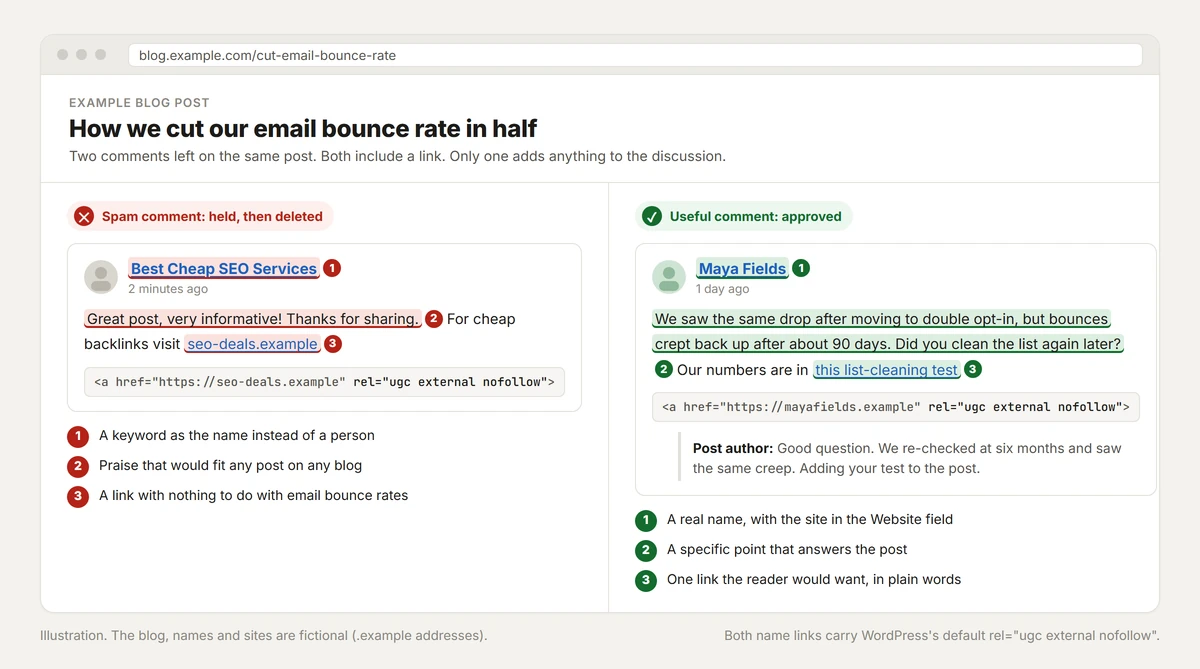
A spam comment and a useful comment on the same post. Both name links get rel="ugc external nofollow"; only one comment gets approved. The blog and names are fictional.
4. Use your real name, not a keyword
The name field is for a person, or a person and a brand if the blog allows it. "Best Cheap SEO Services" in the name field marks a comment as spam at a glance. Google's spam policies use this exact pattern as an example of link spam: a forum comment signed "Paul" and followed by "paul's pizza san diego pizza best pizza san diego".
5. Put your link in the Website field and keep the comment clean
This is how to get backlinks from blog comments without looking like a spammer. WordPress comment forms have a Website field, and WordPress turns your name into a link to whatever address you put there. That linked name is the comment backlink. Use your homepage, or the page on your site that fits the discussion best, and keep the comment text free of links.
Add a link inside the comment only when it answers the point being discussed, such as the study you're quoting, and never more than one. By default, WordPress holds any comment with two or more links for moderation, and it also holds the first comment from anyone who hasn't had a comment approved before. Some blogs have removed the Website field to cut spam: 4 of the 17 sites in our list don't have one, so there the only place for a link is the comment text.
6. Expect nofollow ugc, and check it
WordPress, which added ugc to comment links in version 5.3 (2019), now labels both kinds of comment link. The commenter's name gets rel="ugc external nofollow" and links in the comment text get rel="nofollow ugc". The ugc link attribute tells search engines that a visitor added the link, not the site, and Google has treated nofollow, ugc and sponsored as hints rather than strict rules since September 2019. In practice, expect a comment link to pass little or nothing to your rankings.
To check a link yourself, right-click the commenter's name, choose Inspect and read the rel value on the highlighted link. In our check, commenter links on all 15 sites where we found them carried nofollow, and on 12 of those sites they carried ugc as well.
7. Keep it small and slow
Comment links should be a small part of your link profile, added by hand over months. A burst of comments with the same name and the same link across unrelated blogs is the footprint spam filters are built to catch. Skip tools that post SEO comments for you, and skip lists that promise auto-approved or dofollow comments. Blogs that end up on those lists fill with spam, and many respond by closing comments, as our own list shows.
8. Come back for the conversation
The value of a good comment shows up later. Reply when the author or another reader answers you, follow the blog and share the post if it helped. That's how a comment turns into a relationship, and relationships lead to guest post invitations, interviews and links an editor adds without being asked. To see whether a comment sends visitors, open Google Analytics 4, go to Reports, then Acquisition, then Traffic acquisition, switch the table to Session source and look for the blog's domain.
Comment Backlink Sites: 17 Blogs With Open Comments
This comment backlinks list replaces the 200+ bare URLs that used to sit here. We checked every one of them between 13 and 16 November 2026 and kept only blogs that load as themselves, have published a post since January 2025 and showed an open comment form on a recent post.
The check ran in three passes. A script visited each site with a normal browser user agent, six sites at a time, and read the newest posts from the site's feed or home page. A headless browser then opened the pages that only load in a full browser, such as comment widgets that load by script. Last, for open blogs with no commenter links on the newest post, the script read the blog's comments feed and opened the post with the latest approved comments. On every post it looked for an open comment form and read the rel value on existing commenter links. Nothing was posted.
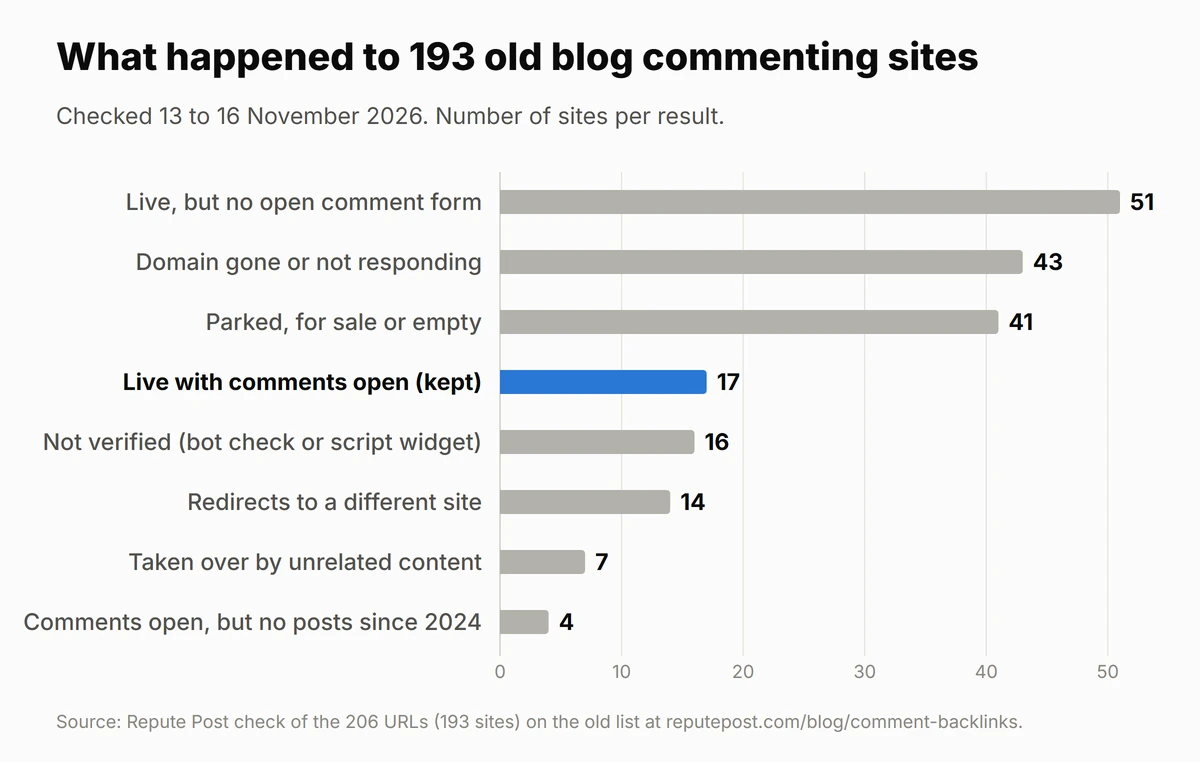
What happened to the 193 sites on our old commenting list, checked between 13 and 16 November 2026. Only the blue bar made the new list.
Site | Niche | Link type | Date checked |
|---|---|---|---|
3ptechies.com | Tech tips and reviews | nofollow ugc | 16 Nov 2026 |
amfastech.com | Tech, security and blogging | not verified | 16 Nov 2026 |
blog.iese.edu | Business and management | nofollow ugc | 16 Nov 2026 |
bloggersideas.com | Affiliate marketing | not verified | 16 Nov 2026 |
blogging-techies.com | Tech (in Spanish) | not verified (Disqus) | 16 Nov 2026 |
bloggingways.net | Blogging, SEO and making money online | nofollow | 13 Nov 2026 |
caricatures.org.uk | Caricatures and cartoons | not verified (no Website field) | 16 Nov 2026 |
cybernaira.com | Blogging, SEO and WordPress | nofollow ugc | 13 Nov 2026 |
dailyblogtips.com | Making money online and blogging | not verified (no Website field) | 16 Nov 2026 |
enchantingmarketing.com | Writing and content marketing | nofollow | 13 Nov 2026 |
itechcode.com | Tech and blogging tips | not verified | 16 Nov 2026 |
lisathomsonlive.com | Books, fiction and poetry | nofollow ugc | 13 Nov 2026 |
manvsdebt.com | Personal finance and debt | nofollow ugc | 16 Nov 2026 |
myrecycledbags.com | Crafts and crochet | nofollow ugc | 13 Nov 2026 |
onenaijablog.com | Tech and gadgets | nofollow ugc | 16 Nov 2026 |
onlyloudest.com | Software guides | not verified | 16 Nov 2026 |
whitecoatinvestor.com | Personal finance for doctors | not verified | 16 Nov 2026 |
"Link type" is the rel value we saw on existing commenter links. "Not verified" means we found no commenter link to read on the pages we opened, and "no Website field" means the form doesn't ask for one. Comment settings change at any time, so open the newest post before you write.
What are comment backlinks in SEO?
A comment backlink is a link to your site that sits in a comment under someone else's post. It takes one of two forms: your name, linked to the address you typed in the Website field, or a link you place in the comment text. A backlink comment is user-generated content: the visitor wrote it and the blog owner only approved it.
That's why search engines treat it differently from a link the site owner chose. Google recommends marking links in comments and forum posts with rel="ugc", and WordPress does it automatically. A blog comment backlink is a labelled, visitor-added link, and forum link building works the same way for the same reason.
Are comments good for SEO?
For the blog that hosts them, useful comments are part of the page: they add questions, examples and detail that the next reader can use. Spam comments do the opposite, which is why Google's guidance on user-generated spam asks site owners to moderate comments and to add nofollow or ugc to links in content they don't trust.
For the person leaving the comment, blog commenting for SEO works only indirectly, through the readers, relationships and brand mentions it brings.
Why do SEOs do comment backlinking?
Because it used to work, and it costs nothing. In the early 2000s a link in a blog comment counted like any other link, so SEOs and spammers left them by the thousand. On 18 January 2005 Google introduced rel="nofollow" specifically to stop comment spam, and WordPress, Blogger and other blog platforms signed up the same day to add it to links in comments.
The reasons people comment today are different:
Readers. A useful comment on a busy post gets read, and some readers click through to the commenter's site.
Relationships. Bloggers notice regular, thoughtful commenters, and that's often how guest post invitations and mentions start.
A natural mix of links. Real sites pick up nofollow links from comments, forums and social profiles over time. A few comment links sit naturally alongside the links that matter.
Visibility. Your name appears in front of an audience that cares about your topic.
What comment backlinks don't do is move rankings on their own. For that, SEOs use links placed inside articles, such as guest posts and niche edits. Here is how the main link types compare.
What makes blog commenting in SEO problematic as a backlink strategy?
Four things, and they add up.
The links are labelled. WordPress adds nofollow and ugc to every comment link by default. Every commenter link we found in our check, on 15 sites, carried nofollow.
Most comments never go live. WordPress holds first-time commenters and comments with two or more links for approval, and many blogs also run a spam filter that catches keyword names and generic praise before the owner sees them.
Google's spam policies name it. The link spam section lists "forum comments with optimized links in the post or signature", and the user-generated spam section lists "comment spam on blogs". Commenting at scale for links is what those policies describe.
The sites don't last. Of the 193 sites on our old list, 17 still take comments on recent posts. Most of the rest are gone, parked, redirected or taken over, and the others are inactive or don't offer an open comment form.
None of this makes a good comment harmful. It makes commenting a poor way to build rankings and a good way to take part in your niche.
Where comment links fit in a link profile
Treat comment backlinks as part of being active in your niche, not as link building. A handful of thoughtful comments a month on blogs your customers read can bring visits, introductions and a few nofollow links that sit naturally next to the rest of your profile. Don't expect them to move a page from position 20 to position 5.
Links that move rankings come from relevant articles on sites with real traffic, placed in the body of the content. If that's what you need, the ReputePost marketplace lists 73,000+ manually reviewed sites you can filter by niche, traffic and link type, and publishers set their own prices, starting at $5.
Related articles
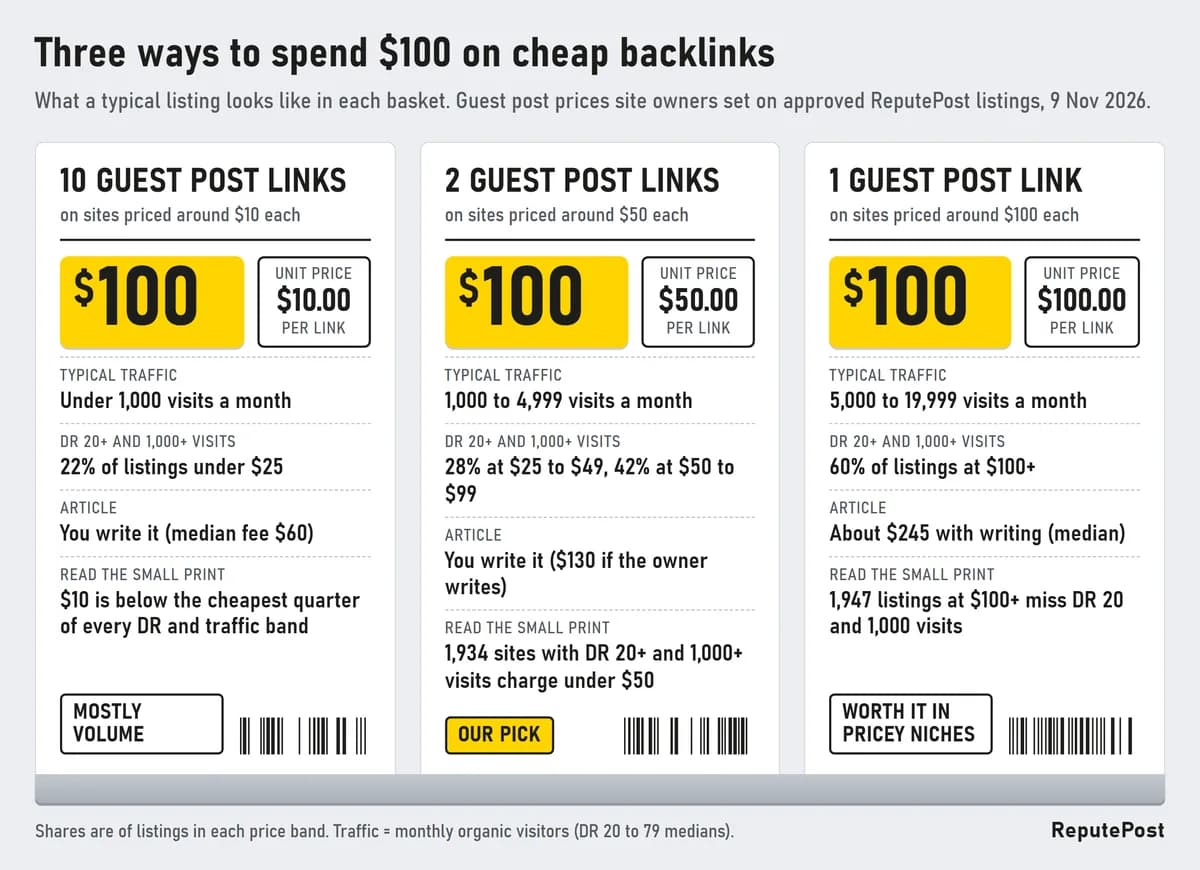
Cheap Backlinks: What $10, $50 and $100 Really Buy
Ten $10 links, two $50 links or one $100 link? We sorted 15,812 approved listings by price to show what cheap backlinks really buy, the red flags in cheap offers, and how to buy safely.
19 min read
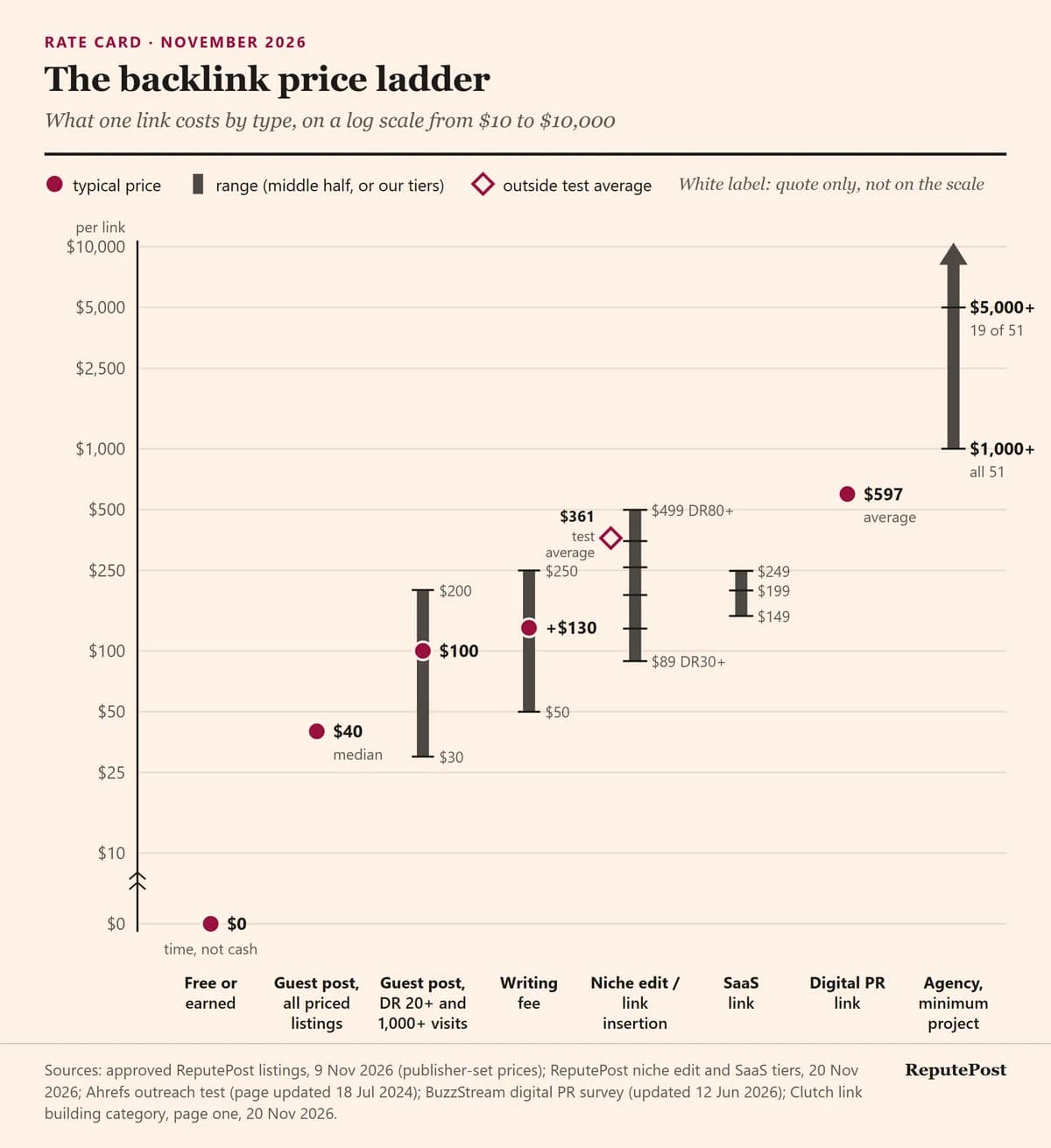
How Much Do Backlinks Cost? Prices by Link Type in 2026
Most backlinks cost $0 to about $600 in November 2026. Our 15,812 listings show traffic, not DR, sets a guest post's price. Rate card, budgets and checks.
15 min read
How to Find Backlinks to Your Website for Free
Five free ways to find backlinks to your website, with real Search Console and Bing screenshots: what each tool shows, its limits, how to check a link you find, and when to disavow (rarely).
15 min read